


The right executive briefing format is a one-page (or one-slide) decision brief built around a single BLUF statement—the decision you need, up top, before any context. That front page needs five things and nothing more: the decision requested, the headline business impact, two to four options with honest trade-offs, a clear recommendation, and an owner with next steps. Keep it to roughly 150 to 300 words and readable in 90 seconds. Anything longer means you’re writing a report, not a briefing.
TL;DR:
- A decision brief should clearly state the specific action required and its immediate business impact at the top of the page.
- The front page must include the decision requested, the main impact metric, a brief situation overview, two to four options with trade-offs, and an owner with next steps.
- Supporting data, detailed models, and technical evidence should be placed in an appendix, not clutter the main one-page brief.
- Craft the brief by writing the decision and recommendation first, then mapping three credible options with real trade-offs, and running a 90-second read test.
- Use formal decision memos only when sign-offs are mandatory; otherwise, a concise one-page briefing is faster, clearer, and often sufficient for internal decisions.
What Is an Executive Briefing Format, and When Should You Use One?
An executive briefing is a decision-focused document. It exists to get a specific action approved, not to report on how a project is going. That distinction trips up more professionals than any formatting question.
A status update tells someone what happened. An executive summary condenses a longer document so a reader can skip the details. A briefing does neither. It asks for something: sign off on this budget, approve this hire, kill this vendor, greenlight this pivot. If you can’t finish the sentence “The decision I need from you is…” you don’t have a briefing yet. You have notes.
The test that separates a real briefing from a dressed-up memo is simple: can the executive answer “what’s being asked, what are the choices, and what do you recommend” after 90 seconds with the page? If they have to hunt for the ask on page three, the format has already failed, regardless of how polished the slides look. Executives read dozens of these a week. The ones that get acted on are the ones that respect that constraint.
What Fields Belong on a One-Page Executive Briefing Template?
Copy this structure directly. It works whether you’re building it in a document or a single slide.
Decision Requested (one line, top of page). Write it as a direct ask, not a topic. “Approve $180K to extend the vendor contract through Q3” beats “Vendor contract update” every time. A decision statement should be specific enough that someone could say yes or no to the exact sentence you wrote, which is a discipline decision memo templates consistently enforce through a named decision owner and explicit trade-offs.
Headline Impact (one line). The single metric or consequence that matters most: revenue at risk, timeline slippage, cost exposure.
Situation (2 to 3 sentences). Just enough context to make the decision comprehensible. Include constraints and timing, not history.
Options (2 to 4 bullets). Each with a short trade-off tag: cost, time, or impact.
- Option A: full vendor renewal. Higher cost, zero disruption, locks in current terms for 12 months.
- Option B: renegotiate scope. Lower cost, two weeks of transition risk, preserves relationship.
- Option C: switch vendors. Lowest long-term cost, 6 to 8 week onboarding gap, unproven delivery.
Recommendation (1 to 2 sentences). State which option and why in plain terms, then name the owner and next steps, plus what would trigger a review.
Keep each field to the word counts above. If you’re working in a slide, use the same fields as headline callouts with the situation and options as supporting bullets underneath. If you’re in a document, this whole thing fits comfortably on one page at 11-point type.
How Do You Write a Briefing That Actually Gets Read?
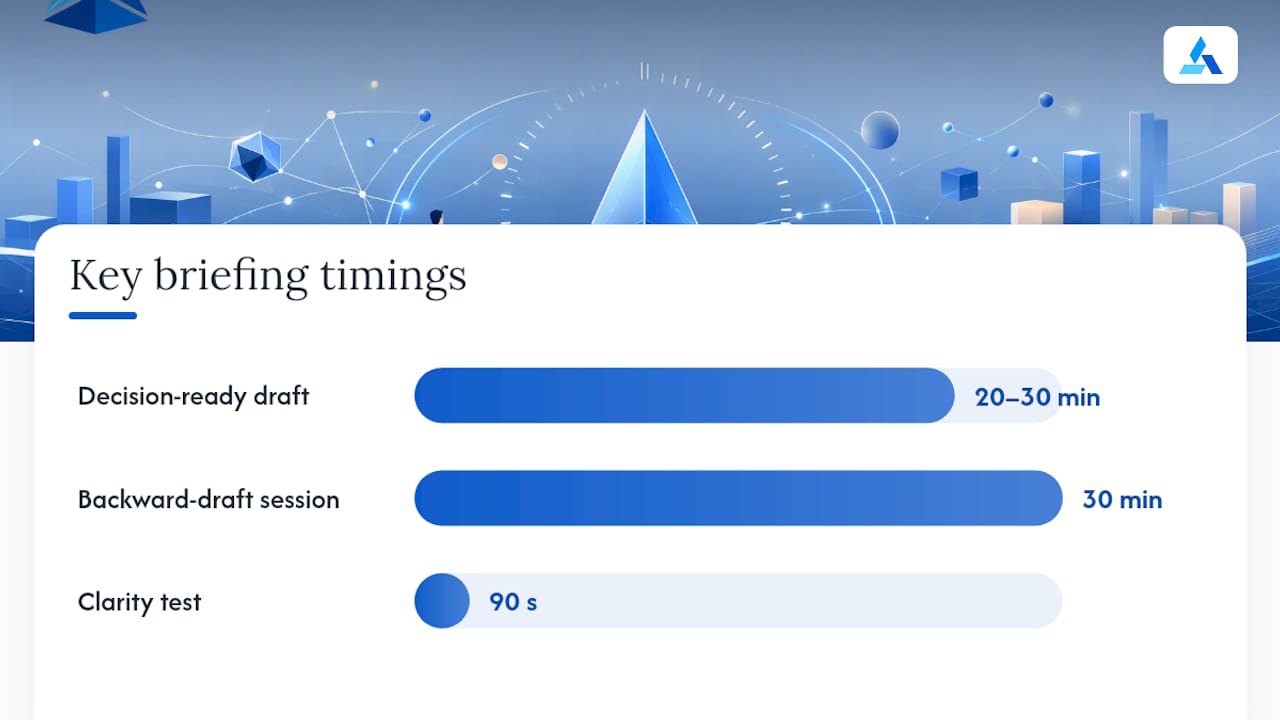
Most people draft a briefing the way they’d write a report: chronologically, background first, conclusion last. That’s backward, and it’s why so many briefings die unread in someone’s inbox.
Here’s a workflow that gets a decision-ready draft done in 20 to 30 minutes.
- Write the decision and recommendation first. Before you touch background, type the ask and your recommended answer. This forces clarity and exposes whether you actually know what you’re asking for.
- Map three credible options. Not one obvious choice dressed up with two straw men. Use real numbers wherever you can, cost, time, projected impact, so the trade-offs are comparable.
- Pick your two or three best supporting facts. Everything else goes into an appendix. This is the hardest discipline for most writers, because the instinct is to prove your case with volume.
- Format for skimming. Active voice. Subheads that work as headlines on their own, not vague labels like “Background.” Short sentences. A 30-minute backward drafting process that starts from Situation, Problem, Options, and Recommendation, rather than history first, fits how executives actually read.
- Run the 90-second test. Hand it to a colleague, or read it cold yourself, and time it. If the decision, options, and recommendation aren’t clear inside 90 seconds, cut front-page text and move support material to the appendix.
Pro Tip: Read your draft out loud starting from the last paragraph. If the recommendation still makes sense without any of the context above it, your context is doing too much work and can probably be cut in half.
Decision Memo or Executive Briefing: Which Do You Actually Need?
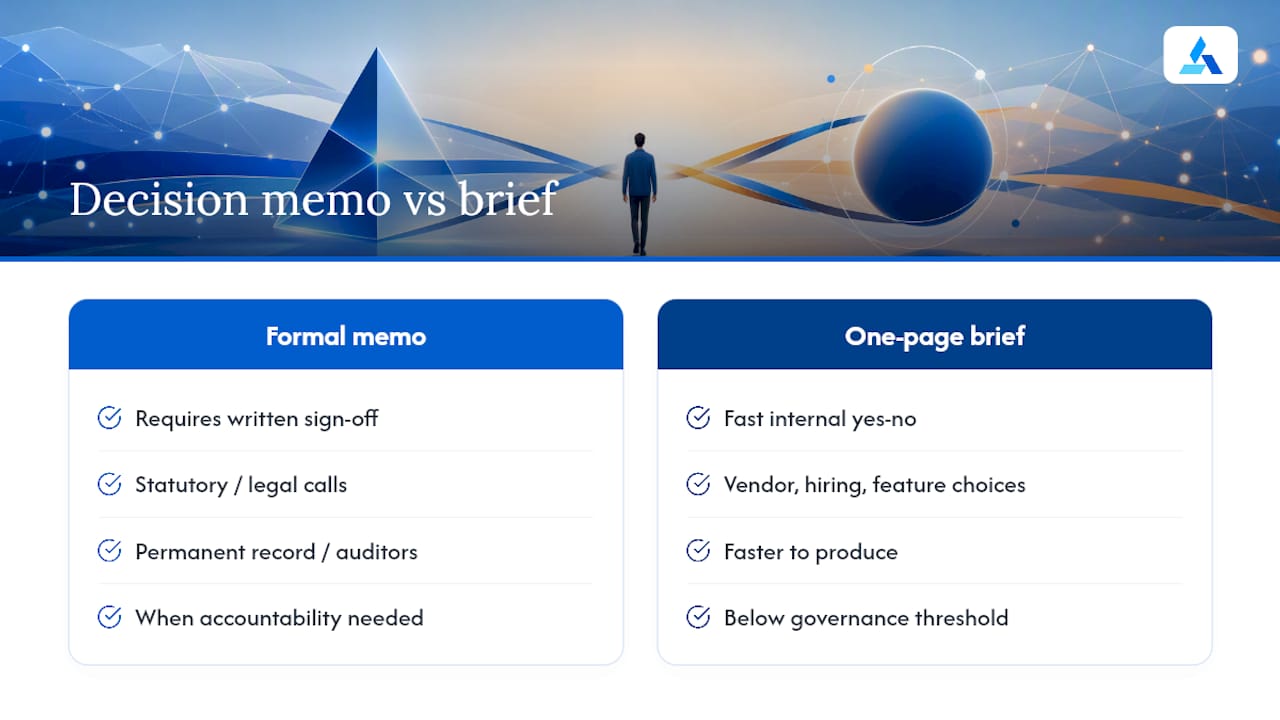
Not every ask needs the same vehicle. A formal decision memo, the kind with a signature block, belongs in situations with sign-off requirements, statutory reasoning, or a permanent record obligation. The DHS Action Memo template is a good reference here: it prescribes Purpose, Background, Options, Recommendation, Timeliness, and a signature page, because someone eventually has to be accountable in writing for that call.
For most internal business decisions, a one-page brief is sufficient, and faster to produce. The fields still map across formats: Decision, Owner, Impact, Trade-offs, and Monitoring appear in both. Use a formal memo for budget approvals above a governance threshold, legal or compliance calls, and anything auditors might ask about later. Use the one-page brief for vendor choices, hiring decisions, feature prioritization, and anything that needs a fast, informed yes or no.
What Numbers and Charts Belong on Page One?
Front-page visuals should answer questions, not decorate the page. Practitioner briefing pack templates converge on a short list: a headline KPI or two, budget variance, a single-line timeline (often called a “plan on a page”), and the top three strategic risks. That risk cap isn’t arbitrary. Briefing pack guidance recommends limiting front-page risks to the three most consequential ones, with a full register pushed to the appendix.
Keep the visual choices boring on purpose:
- Use KPI cards for single numbers that need to land instantly, not line charts that need explaining.
- Use a bridge chart, not a bar chart, when showing budget variance, since it shows exactly where money moved.
- Use a one-line timeline instead of a full Gantt chart. Executives don’t need every milestone, just where you are now relative to the deadline.
- Label every axis. Skip gridlines and extra ticks. If a chart needs a paragraph to explain, it doesn’t belong on page one.
Design for a slide viewed from six feet away, not a spreadsheet viewed up close. That constraint alone kills most of the clutter.
What Goes in the Appendix, and What Stays Off the Front Page?
The appendix is where your evidence lives so the front page can stay short. Financial models, full schedules, the complete risk register, and technical detail all belong there, not squeezed into your decision brief because you’re worried the executive will doubt you without them.
Reference appendix material clearly from the front page. A short line like “See Appendix B for full cost model” tells the reader exactly where to go if they want to dig deeper, without forcing them to read it first. Design the front page to work as a stand-alone document. If a decision maker never opens the appendix at all, the front page should still hold up.
For distribution, attach appendices as a separate file when the brief goes to people outside your regular collaboration tools. Link to shared files instead when the audience already has access, since that keeps version control clean and avoids five people editing five different copies of the same spreadsheet.
When and How Should You Send an Executive Briefing?
Timing matters almost as much as content. Send pre-reads 24 to 48 hours ahead whenever possible, giving executives time to think before a meeting instead of skimming during it. Shorter windows are fine for genuinely time-sensitive calls, but treat that as the exception.
Your subject line should do work: “Decision needed by Friday: Q3 vendor renewal ($180K)” tells the recipient everything they need before they even open the email. Put “Decision required” as the first line of the email body too, not buried in paragraph two.
Copy only the people who need to act or advise. Blind-copy sparingly, and only when there’s a real reason someone shouldn’t see the recipient list. When the ask is genuinely time-sensitive, send directly to the decision owner first and loop in the wider group after, not the other way around.
Quick Checklist: Is Your Briefing Ready to Send?
Run through this before you hit send:
- Can a reader state the decision, options, and recommendation in 90 seconds?
- Is the decision requested phrased as a specific yes/no ask, not a topic?
- Does every option have a real trade-off, not just a description?
- Is there a named owner and a next step, not just a recommendation floating unattached?
- Is supporting evidence in the appendix, not padding the front page?
Copy-paste starting points:
Decision requested: “Approve [specific action] by [date] to [outcome].”
Situation: “[Context sentence]. [Constraint sentence]. [Timing sentence].”
Options: “Option [X]: [description]. Trade-off: [cost/time/impact].”
Recommendation: “We recommend Option [X] because [one reason]. Owner: [name]. Next step: [action] by [date].”
Use 11 to 12 point type for a document, 24 point minimum for slide text viewed on a screen, and generous white space either way. Cramming text to fit one page defeats the purpose of a one-page format.
How Blue Prysm Builds Decision-Ready Briefings from Real Market Data
Most people don’t struggle with formatting a briefing. They struggle with having credible options and numbers ready when the ask lands on their desk with two hours’ notice. That’s the actual bottleneck, and it’s the one Blue Prysm is built around.
Blue Prysm pulls real-time market analysis and competitor tracking into a format that maps directly onto the one-page structure above, so the evidence and the decision brief aren’t two separate projects. Instead of pulling data from six tabs and a stale slide deck, teams working from a market briefing tutorial can move from raw market signal to a decision-ready front page without rebuilding the analysis from scratch each time. The same discipline extends to how the platform frames intelligence for decision-makers, covered in more depth in what an intelligence briefing actually is.
If your team is drowning in ad hoc research every time a briefing is due, that’s a process problem, not a willpower problem, and it’s worth looking at what a structured workflow changes.
What Most People Get Wrong About Briefing Format
The rules above sound simple. In practice, almost everyone violates the same three, and it’s rarely a matter of skill.
The first mistake is burying the decision under three paragraphs of context, because it feels rude to lead with the ask. It isn’t rude. It’s the entire point. The second is treating the appendix as optional, so the front page balloons past a page trying to prove every point instead of trusting the recommendation to stand on its own. The third is decorating the brief with metrics that feel important but don’t touch the decision at hand, a satisfaction rating when the ask is about budget, a headcount chart when the ask is about a vendor.
If a brief runs long, the fastest fix isn’t editing sentence by sentence. Cut the situation section to two sentences, move one option’s supporting detail to the appendix, and reread the recommendation alone. If it still makes sense standing by itself, you’re done.
— Colin Bowdery
Turn Briefing Prep Into a 20-Minute Task, Not a Half-Day Project
Blue Prysm is built for the exact bottleneck this article just walked through: teams don’t lack a template, they lack fast, credible evidence to put behind one. Where a traditional analyst engagement or an internal research sprint can take days to produce a single market snapshot, Blue Prysm’s real-time competitor tracking and market analysis feed straight into a decision-ready brief format, so the numbers on your front page are current the morning you send it.
Strategy leads, executive assistants building pre-reads, and PMs who own weekly decision briefings are the people who feel this most. If you want to see the format in practice before committing to anything, view a sample intelligence briefing built the way this article describes, front page first, appendix behind it. From there, the Starter, Pro, and Enterprise plans lay out exactly what’s included at each tier, with current prices listed on the pricing page. Request a sample briefing for your own market and see what a 20-minute prep window actually looks like.
Templates Worth Comparing Before You Finalize Your Format
A few external references are worth checking against your own draft. The DHS Action Memo template shows how formal government decision memos handle signature blocks and timeliness sections. Practitioner guides like the one-page executive brief breakdown and the PM-focused briefing pack template offer field-by-field structures close to the one in this article. For teams exploring automation, Microsoft’s Executive Briefing Agent for Copilot demonstrates how synthesized calendar and document data can shorten prep time. If you’re preparing external, investor-facing briefings rather than internal ones, this investor pitch checklist covers a related but distinct format worth knowing apart from an internal decision brief.
Sources
- Action Memo Template (DHS)
- Executive Briefing Pack Template – PM Resource Hub
- Decision Memo Template for Executive Decisions – DJH Decision Systems
- Executive Briefing Agent (Microsoft 365 Copilot) — GitHub
FAQ
What Is an Executive Briefing?
An executive briefing is a short, decision-focused document meant to get an executive to approve, reject, or redirect a specific action. It differs from a status report because it asks for something rather than describing progress, and it’s built to be read and acted on in about 90 seconds.
What Are the Main Parts of an Executive Briefing or Summary?
A decision-ready briefing needs five core parts: the decision requested, headline business impact, situation and context, options with trade-offs, and a clear recommendation with an owner and next steps. This structure mirrors the Situation, Problem, Options, Recommendation model that fits how executives actually read.
Can You Give an Example of an Executive Brief?
A sample front page might read: “Decision requested: Approve $180K to extend the vendor contract through Q3. Headline impact: Current contract expires in 21 days; no renewal risks a service gap.” It would continue with three options, each tagged by cost or time trade-off, and close with a one-sentence recommendation and named owner. Blue Prysm’s own sample intelligence briefing shows this structure filled in with live market data.
What’s the Best Format for an Executive Summary or Briefing?
The most effective format is one page or one slide, roughly 150 to 300 words, with the decision and recommendation stated before any background. Longer documents belong in an appendix, not the front page, so the executive can extract the ask, the options, and the recommendation without scrolling.
When Do I Need a Full Decision Memo Instead of a One-Page Brief?
Use a formal decision memo when sign-off requirements, statutory reasoning, or a permanent record are involved, since decision memo templates call for a named decision owner and explicit monitoring triggers that a casual one-pager typically skips. For everyday operational choices, the one-page brief is faster and just as decision-ready.