

TL;DR:
- Customizable AI briefings filter relevant signals to save over 80% of daily information gathering time.
- They provide focused, proactive insights that improve decision-making and reduce cognitive load, unlike traditional dashboards.
Customizable briefings are AI-powered summaries filtered to your specific business priorities, delivering only the signals that matter to your role, your market, and your goals. Most executives waste 20–30 minutes every morning scanning inboxes, dashboards, and news feeds before they find one useful insight. That is the problem tailored briefings solve. Tools like ClarityBriefs, AgentC2, and Carly have proven that when you configure your briefing correctly, you get sharper intelligence in a fraction of the time. The benefits of customizable briefings are not theoretical. They show up in your calendar, your confidence, and your pipeline.
Why use customizable briefings instead of generic news feeds
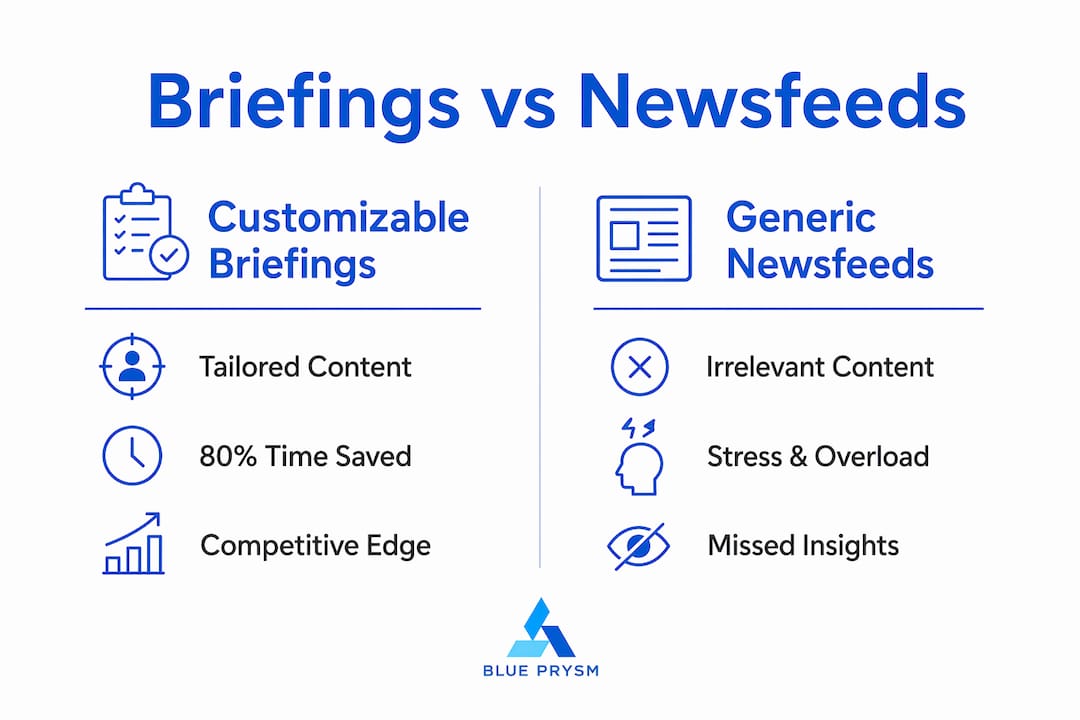
The core case for customizable briefings comes down to one number: over 80% time savings on daily information gathering, cutting the process from 20–30 minutes to under 5 minutes while scanning thousands of sources simultaneously. That is not a marginal improvement. It is the difference between starting your day reactive and starting it informed.

Generic newsletters make the problem worse, not better. 30–40% of content in a standard newsletter is irrelevant to the reader. You are paying with your attention for information that has nothing to do with your revenue pipeline, your competitors, or your customers.
Customizable AI briefings eliminate that noise by filtering to your stated priorities. The result is 100% relevant content, every morning, without manual curation.
Here is what that efficiency gap looks like in practice:
- Time reclaimed: Professionals using AI briefings recover 20+ minutes daily, which compounds to hours of focused work per week.
- Source coverage: Tools like ClarityBriefs scan 87,000+ sources simultaneously. No human can replicate that manually.
- Reduced cognitive load: The push delivery model sends insights to you proactively, so you stop burning mental energy deciding what to check next.
- Fewer missed signals: Proactive briefings reduce the risk of overlooking critical market shifts that a dashboard sitting idle would never surface.
The importance of tailored briefings is not about convenience. It is about competitive awareness. The executive who reads a curated brief at 7 a.m. enters their first meeting with context. The one who skipped it is playing catch-up.
What makes a customizable briefing actually work?
Most professionals set up a briefing once and wonder why it feels generic after two weeks. The reason is almost always configuration. Effective briefings require a modular setup, not a single catch-all prompt.
AgentC2 recommends starting with three core data sources: a revenue metric, a project metric, and your calendar. From there, you iterate. Most executives reach their preferred configuration within 2–3 cycles. That is a few days of minor adjustments, not a months-long project.
Here is a proven setup sequence:
- Start narrow. Pick three sources maximum for your first briefing. A competitor news feed, your CRM pipeline summary, and your calendar are a strong starting trio.
- Use modular prompts. Separate prompts for calendar, competitor news, and project metrics allow you to refine one section without breaking the others.
- Store persistent context. Set your brand, customer profile, and industry focus once in the tool’s system settings. Persistent “Brand DNA” context prevents the AI from generating repetitive generic text every session.
- Let the AI learn passively. Tools that track user clicks and ignores automatically refine relevance without requiring manual corrections. Use this feature. It compounds over time.
- Review and prune at week two. After your first iteration cycle, remove any source or prompt that consistently produces noise. Precision beats volume.
Pro Tip: Save your brand context, key competitors, and top three business priorities as a persistent system prompt in your briefing tool. You will never type the same background information twice, and every briefing will read like it was written by someone who already knows your business.
The AI-driven insights for SMEs that Blue Prysm surfaces follow exactly this logic: start focused, iterate fast, and let the system learn your priorities.
Customizable briefings vs. dashboards: which one actually informs you?
The honest answer is that dashboards show you data. Briefings tell you what it means. That distinction matters more than most executives realize.
| Feature | Customizable briefing | Traditional dashboard |
|---|---|---|
| Delivery model | Push (sent to you) | Pull (you go check it) |
| Format | Narrative synthesis | Raw metrics and charts |
| Cognitive effort | Low | High |
| Source breadth | Thousands of external sources | Internal data only |
| Shareability | High (email, Slack) | Low (requires tool access) |
| Missed signal risk | Low | High (only shows what you track) |
Dashboards are excellent for deep-dive analysis when you already know what question to ask. Briefings are better for daily awareness, because they replace multiple dashboard checks with a single synthesized report. You get the narrative, not just the numbers.
The push model in customizable briefings also reduces the risk of missing critical business pattern shifts. A dashboard sitting idle on a browser tab does not alert you when a competitor drops their pricing. A well-configured briefing does.
For teams that need to share intelligence quickly, briefings also win on format. A two-paragraph summary forwarded to your leadership team takes seconds. A dashboard screenshot with no context takes a meeting to explain.
How decision-makers use briefings in real business workflows
The advantages of personalized briefings become clearest when you see them applied to specific roles. Abstract efficiency claims are easy to ignore. Concrete workflows are not.
- Executives tracking revenue pipelines use morning briefings to surface deal velocity changes, competitor pricing moves, and market news before their first call. Carly’s custom daily briefing combines calendar context with market news in a single email, saving sales and investor relations professionals 20+ minutes daily.
- Consultants managing multiple clients configure separate briefing profiles per client vertical, so each morning brief is scoped to that client’s competitive environment. No cross-contamination, no irrelevant noise.
- Product teams monitoring competitors set standing queries for competitor feature releases, pricing changes, and hiring signals. The briefing surfaces these automatically rather than requiring a weekly manual sweep.
- Finance and research teams use briefings to track macroeconomic indicators, regulatory changes, and sector news without subscribing to six different publications.
Structured morning briefing routines also correlate with lower stress and higher perceived control. Replacing chaotic inbox scanning with a deliberate read-and-act workflow changes how you enter your day. That is not a soft benefit. It affects the quality of every decision you make before noon.
The intelligence briefing guide for decision-makers at Blue Prysm covers how to structure these workflows for different business functions, including finance, marketing, and operations.
Key takeaways
Customizable briefings deliver over 80% time savings on daily information gathering while providing 100% relevant content, making them the most efficient intelligence tool available to business decision-makers.
| Point | Details |
|---|---|
| Time savings are dramatic | AI briefings cut daily information gathering from 30 minutes to under 5 minutes. |
| Generic newsletters waste attention | 30–40% of standard newsletter content is irrelevant to the average reader. |
| Modular setup beats single prompts | Separate prompts for calendar, news, and metrics allow precise iteration without breaking the briefing. |
| Push beats pull for daily awareness | Briefings proactively surface critical signals that dashboards only show when you go looking. |
| Persistent context is non-negotiable | Storing brand and priority context once prevents generic output and improves every subsequent briefing. |
The uncomfortable truth about information overload
I have worked with dozens of executives who swear they are “on top of things” because they check three news apps, two dashboards, and a Slack channel every morning. What they are actually doing is performing awareness rather than practicing it. They feel busy. They are not informed.
The shift to customizable briefings is not just a productivity hack. It is a discipline change. When you configure a briefing correctly, you are forced to articulate what actually matters to your business. That exercise alone is clarifying. Most leaders have never written down their top three intelligence priorities in a single sentence.
The pitfall I see most often is over-configuration. Executives add twelve sources in week one because more feels safer. The briefing becomes a wall of text, and they stop reading it by week three. Start with three sources. Ruthlessly cut anything that does not directly connect to a decision you make regularly.
AI will keep getting better at passive learning and synthesis. But the quality of your briefing will always reflect the quality of your configuration. Garbage in, garbage out. The AI-powered decision-making guide at Blue Prysm puts it plainly: the tool amplifies your thinking. It does not replace it.
— Colin Bowdery
Blue Prysm brings customizable briefings to your strategy workflow
Blue Prysm builds the kind of intelligence infrastructure that used to require a full research team. The platform’s competitive intelligence software tracks competitor moves automatically and feeds that data directly into your briefing workflow. The market research tools layer in sector trends and buyer signals so your briefings reflect what is actually happening in your market, not just what you already knew to look for.
Blue Prysm is built for SMB executives and founders who need elite-level intelligence without the consulting bill. If you want to see what a properly configured AI briefing looks like for your industry, the sample intelligence briefing shows the format and depth you can expect from day one.
FAQ
What is a customizable briefing?
A customizable briefing is an AI-generated summary filtered to your specific business priorities, pulling from thousands of sources and delivering only the signals relevant to your role and goals.
How much time do customizable briefings save?
Professionals using AI briefings reduce information-gathering time by over 80%, cutting the daily process from 20–30 minutes to under 5 minutes.
How is a briefing different from a dashboard?
Briefings use a push model to deliver synthesized narratives proactively. Dashboards require you to log in and interpret raw data, which increases cognitive load and the risk of missing key signals.
How many sources should I start with?
Start with three core sources: a revenue or pipeline metric, a competitor news feed, and your calendar. Most executives reach their ideal configuration within 2–3 iteration cycles.
Do customizable briefings work for small businesses?
Yes. Tools like Blue Prysm and Carly are designed specifically for smaller teams that cannot afford dedicated research staff but still need accurate, timely market intelligence to compete effectively.